A Professional Headshot That’s Totally "You"
Your headshot is often the first professional impression you make—from LinkedIn, your company website, or a proposal from your team. While expensive gear is a common suggestion, you don’t need fancy equipment to look polished. Your smartphone can capture photos that feel professional, approachable, and totally “you.”
How to Take Professional Photos on Your Phone
Here’s how to make it happen, with some of our favorite tips pulled straight from the Wonderstruct Headshot Guide:
1. Lighting Makes or Breaks It
- Good lighting is essential for professional-quality photos. Natural light is your best friend. Stand near a window or head outside in the shade.
- Skip direct overhead lights or midday sun—they create harsh shadows.
- Always face the light so it hits your face evenly.
Wonderstruct Tip: “If you can see a hard shadow on the ground, the light is too strong. Move to softer light—think window glow, not spotlight.”
2. Pick a Simple Background
- Keep it clean. A plain wall, bookshelf, or blurred outdoor spot is perfect.
- Avoid clutter that will pull focus away from your face.
- If you’re doing team photos, pick one background style so everyone looks consistent.
Pro Tip: Stand a couple feet from the wall. It keeps you from casting a shadow and gives the background a softer feel.

3. Frame It Right
- One of the simplest tricks when figuring out how to take professional photos with your phone is framing. Hold the camera at eye level—no high angles or chin shots.
- Aim for head-and-shoulders in the frame with a little space above your head.
- Step back and zoom slightly instead of holding the phone too close (this avoids that “fishbowl” effect).
Wonderstruct Tip: “Your headshot should feel like a friendly hello—your face belongs front and center.”
4. Set Up Your Phone the Smart Way
- Give the lens a quick wipe (fingerprints make everything look hazy).
- Use the rear camera—it’s sharper than the selfie lens.
- Stabilize your phone with a tripod, a stack of books, or anything steady.
- Turn on the timer so you can get into position and relax.
- Use grid lines (rule of thirds) to frame shot.
Pro Tip: Ask a coworker or friend to snap a few. You’ll feel more natural when you’re not juggling the phone yourself.
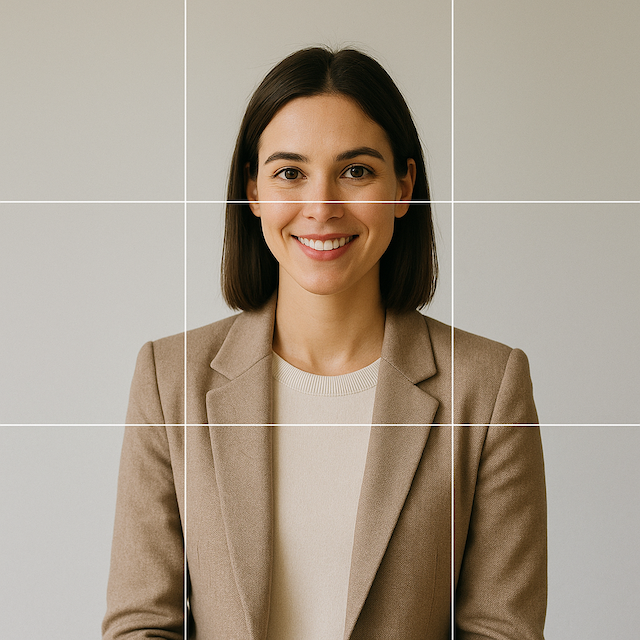
5. Dress and Groom for Picture Day
What you wear and how you show up matters just as much as the camera setup.
- Dress for the role you’re in. Blazers and crisp shirts read polished, while smart-casual works great for creative industries. Avoid hats.
- Solids are your friend. Patterns, stripes, or neon colors can be distracting.
- Check the little things—smooth hair, lint-free clothes, collars in place.
- Skip fabrics that shine or reflect light.
- Add a personal touch if you want—like a bold necklace or favorite color—just don’t let it take over the photo.
- Need outfit inspiration? Head to Pinterest and search for ideas.
Wonderstruct Tip: “Neutrals and jewel tones look great on camera. Tiny patterns and neon? Not so much.”
6. Bring the Right Energy
- Take a breath, roll your shoulders back, and let yourself relax.
- Smile like you’re greeting someone you actually want to talk to.
- Keep your chin level and posture open—it communicates confidence.
- Lean slightly toward the camera. It feels more engaging and gives energy to the shot.
- Put your weight on your front foot. This subtle shift helps your posture look natural and avoids that rigid “ID photo” stance.
- Angle your body slightly. Turn your shoulders about 10–15° from the camera—never straight on. It adds dimension and looks more relaxed.
- Keep your chin level or slightly down. It elongates your neck and avoids shadowing under the chin.
- Check your hands and arms. Keep them loose at your sides or gently crossed; avoid clenched fists or hidden hands.
Pro Tip: The best shots usually come when you stop “posing” and just start being yourself.
7. Finish Strong
- The final step in how to take professional photos is a light edit—brighten, crop, or adjust slightly.
- Skip the heavy filters. You want to look like you.
- If you’re shooting as a team, use the same editing style across everyone’s photos so it feels consistent.
Final Thought
Mastering how to take professional photos doesn’t require expensive studios—it’s about intention, consistency, and a few smart techniques. With a little prep—good light, a simple background, and some attention to detail——you can get a photo on your phone that looks every bit as professional as something taken in a studio.
At Wonderstruct, we help infrastructure firms strengthen their visual brands—from team headshots and proposal templates to website and social media design. We’ve put together full guides and checklists for companies who want to streamline “picture day” so everyone—from interns to execs—shows up polished and consistent. Want the full version for your team? Let’s talk.
Subscribe to receive the latest columns posts to your inbox every week.
.jpg)